Giving AI agents tools for the Umbraco backoffice with WebMCP
Chrome's new WebMCP API lets a page hand an AI agent a list of named tools, so I tried it on the Umbraco 18 backoffice to see whether an agent could get around it, Umbraco Forms included, without reading a single screenshot.
Lately I've been using agents to click around backoffices: smoke testing release branches and reproducing bug reports, driven through Playwright MCP. It works, but every step is the same loop... take a snapshot of the accessibility tree, guess which button is the right one, click it, take another snapshot. Hover menus that never appear in headless Chrome, trees that need expanding first, and elements that intercept the click all make it slow and fragile, and it eats tokens.
WebMCP turns that around. Instead of the agent working out what a page can do, the page tells it, by registering tools with document.modelContext.registerTool(). Each tool has a name, a description and a JSON Schema for its input, and the agent calls it directly. It's a W3C Web Machine Learning Community Group draft, so it's not a standard (yet). Chrome 149 has it in an origin trial, and the API only moved from navigator to document in July. So it's early days.
The Umbraco MCP posts so far, like the Developer MCP announcement, Luuk's GitHub Copilot setup and Kaspar's benchmark of eleven models building a blog, are all about the server side. I couldn't find anything about tools that live in the open backoffice, so I built a small package to find out what's possible. Let's dig in...
Three ways in: the Umbraco MCP, WebMCP and Playwright
The thing that made this click for me is that these three don't compete. They enter the same stack at different layers:
flowchart LR
  PW["Playwright"] --> UI
  WM["WebMCP tools"] --> APP
  DM["Umbraco Developer MCP"] --> API
  subgraph umbraco ["Umbraco"]
    direction TB
    UI["Rendered UI<br/>DOM, pixels, clicks"] --> APP["Backoffice app<br/>contexts, actions, router"] --> API["Management API"] --> SRV["Server<br/>services, database"]
end- The Developer MCP is a separate Node process that talks to the Management API as an API user. There's no browser, so it's great for seeding content and bulk changes, but no workspace, modal or button handler ever runs.
- WebMCP tools run inside the backoffice page as the logged-in user, calling the same JavaScript the UI is built on. They skip the rendering and the clicking, but not the backoffice's own logic.
- Playwright drives the rendered page, so nothing on the client is skipped. That's what you want when the UI itself is what you're testing.
Each layer down is faster and steadier, but exercises less of the product. That trade-off comes back later, in the modals section.
The mental model I ended up with is landmarks and controls. The landmarks are where you can go: sections, sidebar menus, trees and workspaces. The controls are what you can do once you're there: entity actions (the "..." menu), create options, workspace actions and modal buttons. It's a metaphor rather than ARIA. These aren't ARIA landmark roles or HTML controls, but they do the same job for an agent that those do for someone using a screen reader.
Registering tools from a backoffice entry point
Tools can do anything the logged-in user can, so I didn't want them loading everywhere. The package serves its backoffice entry points from C# instead of a static umbraco-package.json, and only when they're switched on. There's one for the tools themselves, and one for each way they reach an agent. For now that's only WebMCP, with its own ModelContext setting, so another way in can get a setting of its own later. By default, they only load in Development:
public Task<IEnumerable<PackageManifest>> ReadPackageManifestsAsync(){    WebMcpOptions options = _options.Value;    var defaultEnabled = options.Enabled ?? _hostEnvironment.IsDevelopment();
    // Each surface is its own entry point, so a surface that isn't enabled is never loaded in the browser.    List<object> surfaces = [];    if (options.ModelContext ?? defaultEnabled)    {        surfaces.Add(EntryPoint("ModelContext", "WebMCP Model Context Entry Point", "umbraco-community-webmcp-model-context.js"));    }
    if (surfaces.Count == 0)    {        return Task.FromResult(Enumerable.Empty<PackageManifest>());    }
    PackageManifest manifest = new()    {        Id = Constants.PackageId,        Name = Constants.PackageId,        Version = typeof(WebMcpPackageManifestReader).Assembly            .GetCustomAttribute<AssemblyInformationalVersionAttribute>()?.InformationalVersion,        AllowTelemetry = false,        // The tools themselves first, then the surfaces that make them reachable.        Extensions = [EntryPoint("EntryPoint", "WebMCP Entry Point", "umbraco-community-webmcp.js"), .. surfaces],    };
    return Task.FromResult<IEnumerable<PackageManifest>>([manifest]);}
private static object EntryPoint(string aliasSuffix, string name, string fileName) => new{    type = "backofficeEntryPoint",    alias = $"{Constants.PackageId}.{aliasSuffix}",    name,    js = $"/App_Plugins/{Constants.PackageId}/{fileName}",};
On the client, the WebMCP entry point registers each tool with WebMCP when the browser supports it. Because the API only just moved, it checks navigator as well as document:
export function getModelContext(): ModelContext | undefined {  return (document as any).modelContext ?? (navigator as any).modelContext;}
await modelContext.registerTool(  {    name: tool.name,    title: tool.title,    description: firstSentence(tool.description),    inputSchema: tool.inputSchema,    annotations: { debugging: true, ...tool.annotations },    execute: async (input, client) => {      try {        return JSON.stringify(await this.call(tool.name, input, { signal: client?.signal }));      } catch (error) {        // WebMCP reports a thrown error as a generic UnknownError, so the agent would never see why        return JSON.stringify({ error: error instanceof Error ? error.message : String(error) });      }    },  },  { signal: controller.signal },);
Aborting the signal unregisters the tool. That's the current spec's way of removing one, now that unregisterTool has gone.
That try/catch matters too. If execute throws, WebMCP doesn't pass your message on: the agent just gets UnknownError: Tool was executed but the invocation failed. So every error comes back as a result instead, and a call with a missing parameter says which ones the tool expects. Google's WebMCP tools repo has a good guide on this, and on tool design generally.
WebMCP only gets the first sentence of each description. An agent can carry every registered tool's definition on every turn, so long descriptions add up quickly, and the rest is one umbraco_get_tool_description call away.
Reading the extension registry instead of writing tools per package
This is the bit I was most curious about. Could the tools find their way around any package's UI, rather than me writing tools for every section?
Well, thank goodness we're the friendly CMS! The backoffice already describes itself. Every section, sidebar menu, tree and workspace is a manifest in the extension registry, so the tools read the registry the same way the UI does. Here's how a section's menu is found:
function getMenuItems(section: UmbSectionInfo) {  const menuAliases = umbExtensionsRegistry    .getByType('sectionSidebarApp')    .filter((app: any) => app.meta?.menu && isInSection(app, section.alias))    .map((app: any) => app.meta?.menu as string);
  return umbExtensionsRegistry    .getByType('menuItem')    .filter((item: any) => item.meta?.menus?.some((menu: string) => menuAliases.includes(menu)))    .map((item: any) => ({      alias: item.alias,      label: localize.string(item.meta?.label ?? item.name),      entityType: item.meta?.entityType ?? null,      treeAlias: item.kind === 'tree' ? item.meta?.treeAlias : null,    }));}
Trees are the same idea. A tree manifest names its repositoryAlias, so the tool creates that repository and calls requestTreeRootItems, requestTreeItemsOf and requestTreeRoot on it. The last one returns the tree's root entity (forms-form-root for Forms), which is where actions like Create live. Before I added it, the agent had to guess that.
Opening anything is then one standard path pattern, UMB_WORKSPACE_EDIT_PATH_PATTERN:
return navigate( unique ? UMB_WORKSPACE_EDIT_PATH_PATTERN.generateAbsolute({ sectionName, entityType, unique }) : UMB_WORKSPACE_PATH_PATTERN.generateAbsolute({ sectionName, entityType }),);navigate() is just history.pushState, which works because the backoffice router patches pushState to listen for it.
Then I installed Umbraco Forms on the test site, and without a line of Forms-specific code the tools listed the Forms section, its menu, and the Forms, Data Sources, Prevalue Sources and Security trees. They could also open a form by its key. Success! 🥳
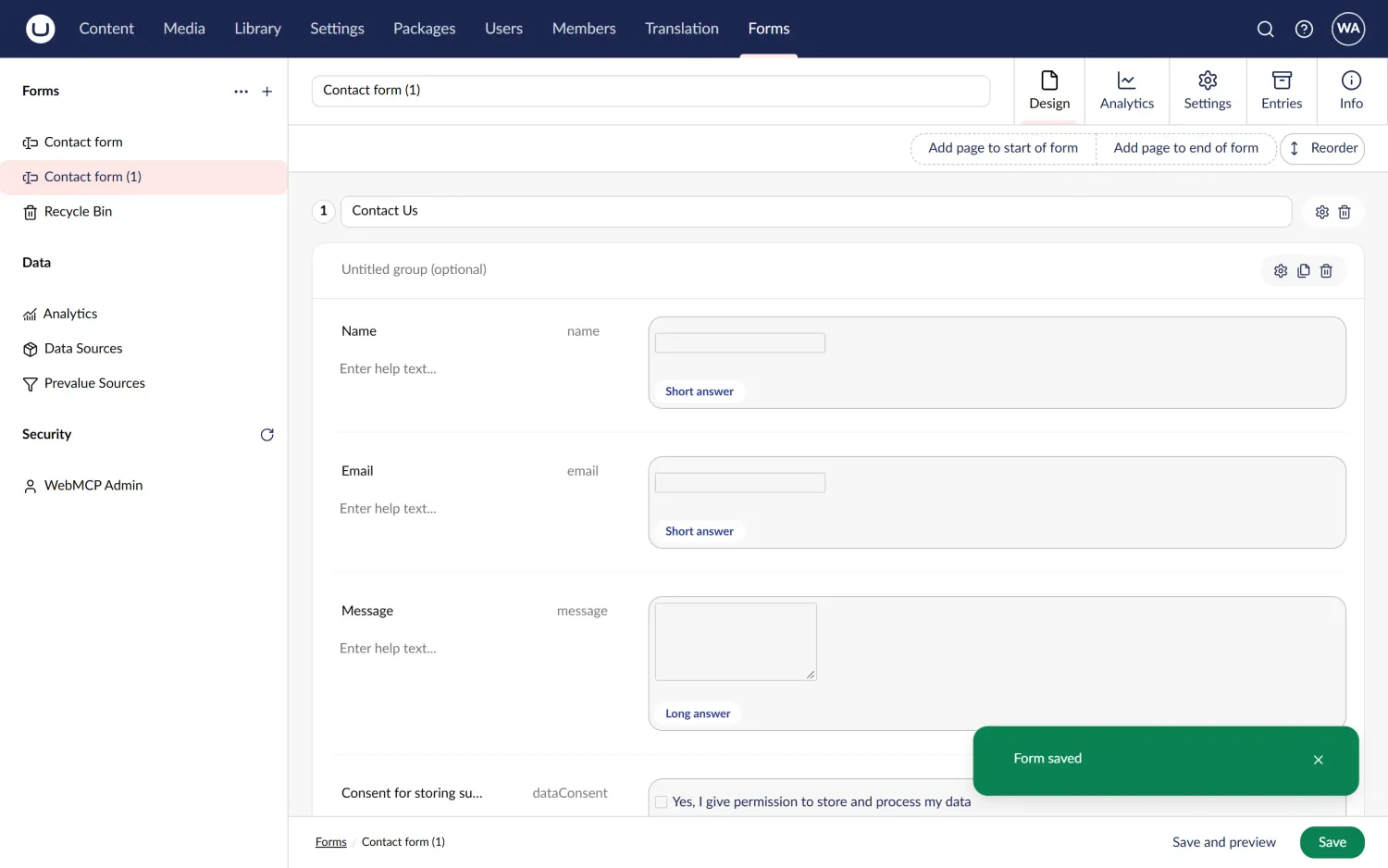
A Contact form created from Forms' contact template and saved, with two generic tool calls: umbraco_run_create_option, then umbraco_run_workspace_action with Save. No Forms-specific code.
Entity actions, create options and a hidden host element
Getting around is half of it. The other half is the controls, starting with the "..." menu on each tree item. Entity actions are registered against entity types (forEntityTypes), and many of them have conditions that check the current user's permissions or the entity itself. I wanted the agent to get exactly the actions a person would see, so the tool builds them the way core does.
The umb-entity-action-list element reads the entity from an UmbEntityContext. A tool doesn't have an element to put that context on, so it makes one: an invisible element inside the backoffice, which provides the context while the actions are created.
@customElement('umb-webmcp-entity-host')class UmbWebMcpEntityHostElement extends UmbLitElement {  static override styles = css`    :host {      display: none;    }  `;}
const element = new UmbWebMcpEntityHostElement();host.getHostElement().appendChild(element);const entityContext = new UmbEntityContext(element);entityContext.setEntityType(entityType);entityContext.setUnique(unique);
new UmbExtensionsApiInitializer(  element,  umbExtensionsRegistry,  type, // 'entityAction' or 'entityCreateOptionAction'  (manifest: any) => [{ entityType, unique, meta: manifest.meta }],  (manifest: any) => manifest.forEntityTypes.includes(entityType),  (controllers) => {    permitted = controllers;    onChange();  },);
It feels a bit hacky, but the conditions see exactly what they'd see from a tree item. The Forms root returned Create, Import Form Definition and Reload children; a form returned Move, Copy, View Entries, Delete and the rest. Side effects still happen too: after a delete run this way, the form disappears from the sidebar tree as it would after a click.
The Create action only opens a dialog, so the same code runs with entityCreateOptionAction too. That gives the agent New Form, the two form templates and New Folder directly, without opening the dialog first.
This is where the fun begins: modals
Most actions open a modal, and modals caused both of my real dead ends.
The first was a hang. An action's execute() usually waits until its modal closes, but the agent is the only one who can close it, and it's still waiting for the tool to return. So action tools now return early:
export async function runWithoutBlocking(work: () => Promise<unknown>, waitMs = 1500) { let error: unknown; let completed = false; const promise = work().then( () => (completed = true), (reason) => { completed = true; error = reason; }, ); await Promise.race([promise, new Promise((resolve) => setTimeout(resolve, waitMs))]); if (error) throw error instanceof Error ? error : new Error(String(error)); return { completed, promise };}If a modal is open, the tool returns { completed: false }, and the agent carries on with umbraco_list_modals.
The second one surprised me. My first modal tools went through the modal manager: list the open modals, then call submit() on the right one. I ran Delete on a form, listed the modals, found the Forms delete confirmation and submitted it. The tool said { ok: true }. The form was still in the tree. 🤷♂️
The confirmation modal deletes the form in its own Delete button's click handler, and only submits afterwards. Submitting through the modal's context skips the part that does the work. That's the layers trade-off from earlier, one step down from the button.
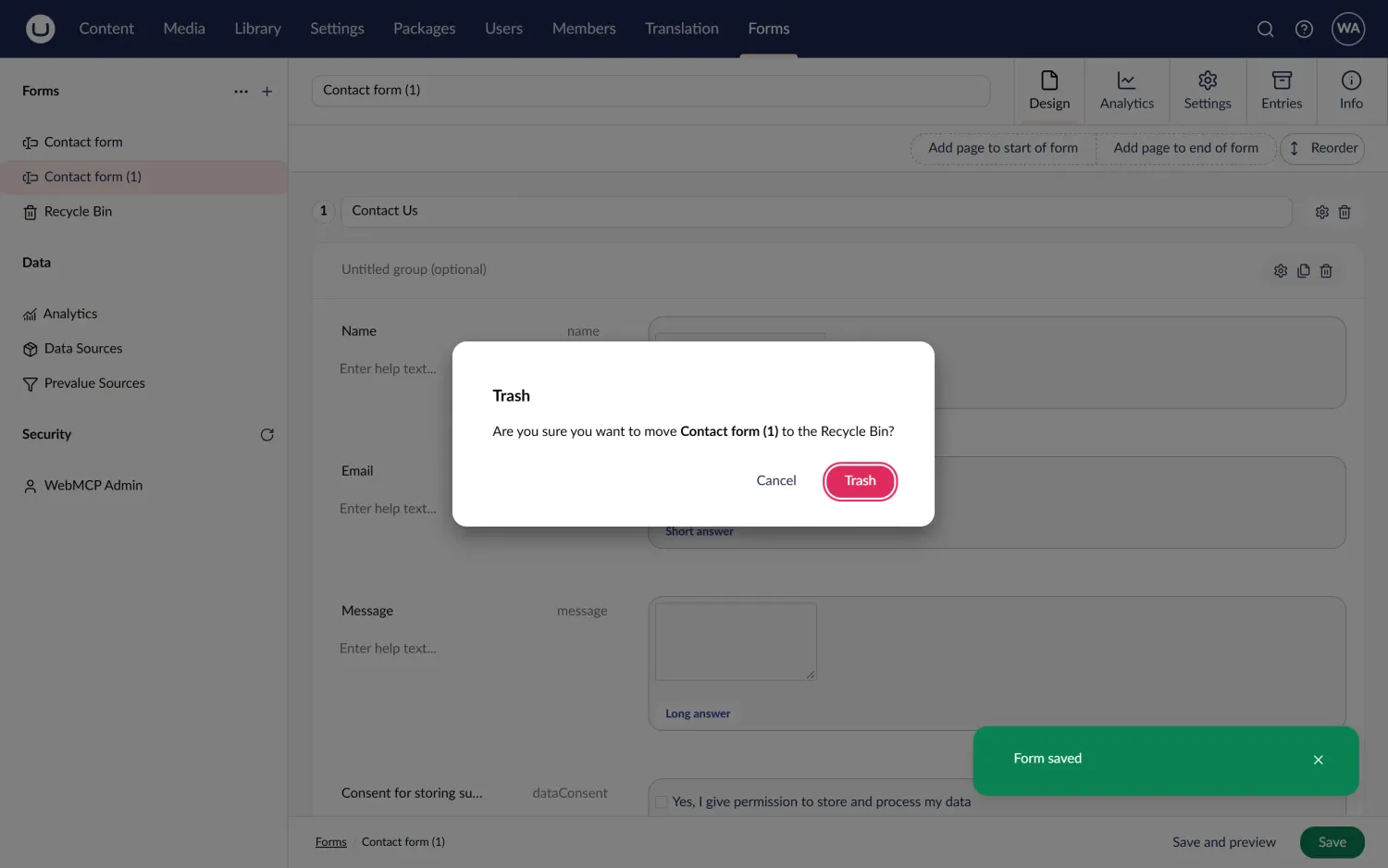
The Trash confirmation in Umbraco Forms 18.2.1, opened by umbraco_run_entity_action. umbraco_list_modals reports its two buttons, cancel and confirm (labelled Trash), and umbraco_click_modal_button clicks the real one.
The fix is to click the real button. Every modal built on UmbModalBaseElement exposes a public modalContext getter, so the tool walks the DOM (shadow roots included) for the element whose context has the right key, then clicks its uui-button:
export function findModalElement(key: string, root: Node = document.body) {  for (const element of walk(root)) {    if ((element as any).modalContext?.key === key) return element;  }  return undefined;}
export function findButton(buttons: Array<UmbWebMcpModalButton>, { id, label }: { id?: string; label?: string }) {  if (!id && !label) throw new Error('Pass the id or the label of a button from umbraco_list_modals.');  const button = id    ? buttons.find((x) => x.id === id)    : buttons.find((x) => x.label.toLowerCase() === label!.toLowerCase());  const description = id ? `with id "${id}"` : `labelled "${label}"`;  if (!button) throw new Error(`No button ${description}. Use umbraco_list_modals for the buttons.`);  if (button.disabled) throw new Error(`The button ${description} is disabled.`);  return button;}
// modal.tools.tsfindButton(getButtons(findModalElement(key)), { id, label }).element.click();
umbraco_list_modals now returns each modal's buttons, and umbraco_click_modal_button clicks one, then waits for the modal to close before it returns. This time the form was gone. Labels get translated, though, so the buttons come with their id too (confirm and cancel in the confirmation dialogs), and the tool matches by id when it's given one.
Tools that come and go with workspaces
Some tools only make sense while something is open. "Save this" needs a workspace, and "set this property" needs a document. A workspaceContext manifest with no conditions is created in every workspace that opens, with the workspace's API as its host (see workspace.element.ts). That makes it the natural place to register workspace tools, and to unregister them again when the workspace closes:
export const manifests: Array<UmbExtensionManifest> = [ { // No conditions, so it is created in every workspace. type: 'workspaceContext', alias: 'Umbraco.Community.WebMCP.WorkspaceContext', name: 'WebMCP Workspace Context', api: () => import('./webmcp.workspace-context.ts'), }, { type: 'webMcpWorkspaceToolset', alias: 'Umbraco.Community.WebMCP.WorkspaceToolset.Document', name: 'WebMCP Document Workspace Toolset', api: () => import('./document.workspace-toolset.ts'), conditions: [{ alias: UMB_WORKSPACE_CONDITION_ALIAS, match: UMB_DOCUMENT_WORKSPACE_ALIAS }], },];The generic workspace context adds tools that work in any workspace: one that says what's open, including its footer buttons, and one that runs a button by its label. That's how the agent saved a new form from the contact template, by running the form workspace's own Save action. It also runs any webMcpWorkspaceToolset extensions whose conditions match, so the document tools only exist in a document workspace.
That custom extension type is how other packages can add their own tools. If this package isn't installed, nothing reads those manifests, so a package can ship them in its umbraco-package.json with no dependency at all.
One gotcha: open a document in a modal on top of another document, and you have two registrations of the same tool name. WebMCP rejects a duplicate name, so all tools go through a small hub that registers each name once. The newest registration handles calls, and when it closes, the one underneath takes over again.
Calling the tools
WebMCP needs Chrome 149+ with chrome://flags/#enable-webmcp-testing (or the origin trial), plus an agent that can call it. I tried two MCP servers that already can.
Chrome DevTools MCP gives the agent two tools of its own, list_webmcp_tools and execute_webmcp_tool, and the agent asks the page what it has:
claude mcp add chrome-devtools -- npx -y chrome-devtools-mcp@latest \ --categoryExperimentalWebmcp --acceptInsecureCerts --isolated \ --chromeArg=--enable-features=WebMCP,WebMCPTesting,DevToolsWebMCPSupportPlaywright MCP picks up the tools a page registers and gives the agent each one as its own, named webmcp_<tool name>, as long as it launches Chrome with WebMCP switched on. Save this as playwright-mcp.json:
{ "browser": { "launchOptions": { "args": ["--enable-features=WebMCP,WebMCPTesting"] } } }Then add it with Chrome and that config:
claude mcp add playwright -- npx -y @playwright/mcp@latest --browser chrome --config playwright-mcp.jsonLog in to the backoffice, and the agent can call tools like umbraco_open_document either way. Create a form from the contact template, save it, open it from another section, delete it through its confirmation modal: each is one tool call, not a dozen snapshots.
From a Playwright test, you don't need an agent at all. Chrome's document.modelContext.getTools() lists the tools and executeTool() runs one:
// benchmarks/tests/webmcp-tools.ts (trimmed)export async function callTool(page: Page, name: string, input: object = {}) { await expect.poll(() => webMcpToolNames(page)).toContain(name); return page.evaluate( async ({ name, input }) => { const modelContext = (document as any).modelContext; const tool = (await modelContext.getTools()).find((x: any) => x.name === name); return JSON.parse(await modelContext.executeTool(tool, input)); }, { name, input }, );}The poll is there because workspace tools only register once their workspace has loaded. If your CI runs Playwright's bundled Chromium rather than Google Chrome, Google's WebMCP polyfill gives it a document.modelContext; load it with page.addInitScript before the backoffice. The same end-to-end tests pass both ways.
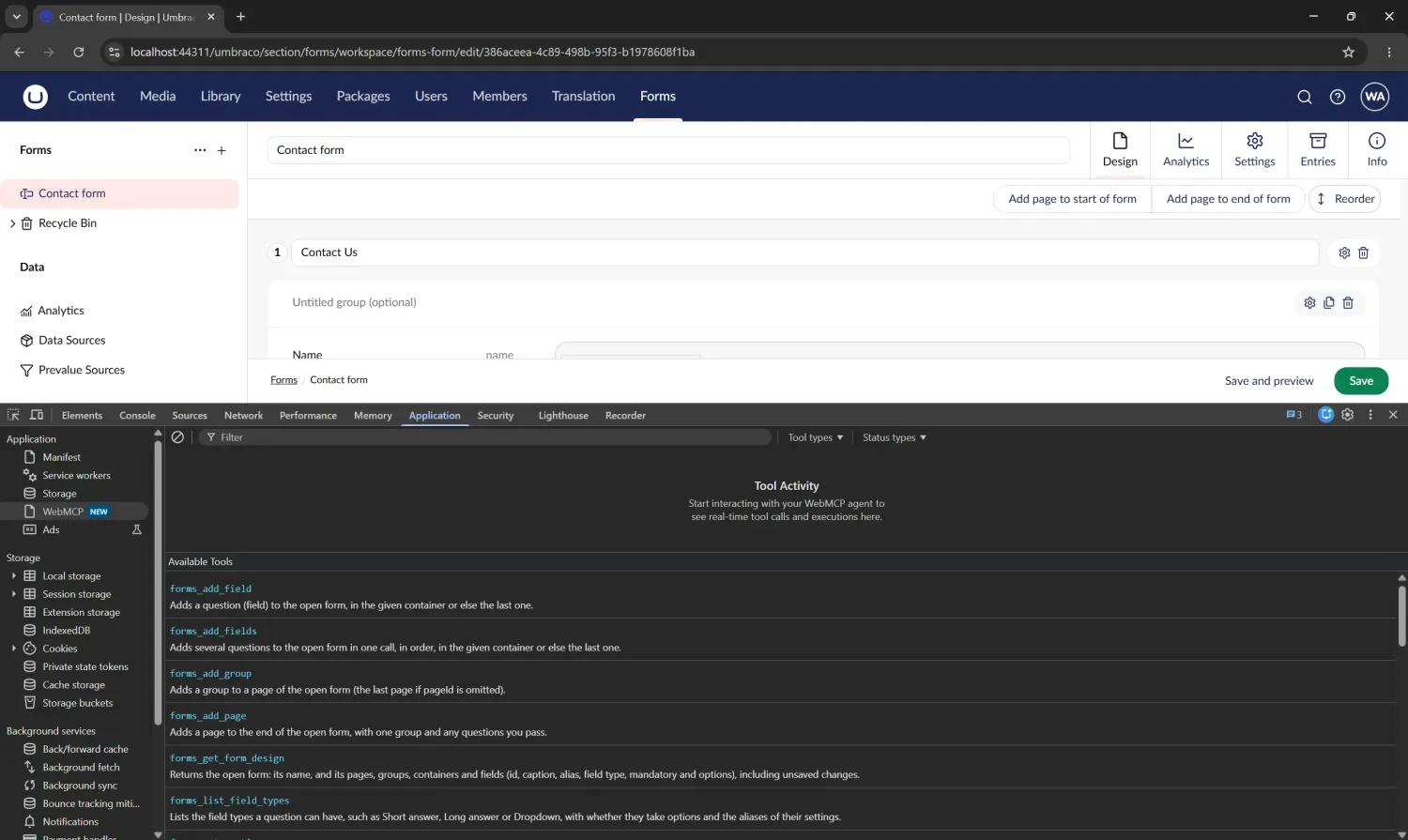
Chrome DevTools, Application → WebMCP, with a form open in the Forms designer: the page's available tools, including the Forms toolset's forms_add_field and forms_get_form_design.
Should your tests use it?
My suggestion would be: yes, but not for everything.
Think about where the flakiness in a backoffice Playwright suite actually comes from. In my experience it's mostly getting to the thing under test: hover menus that don't appear in headless Chrome on CI, trees that need the right caret expanded, an element under a split panel that swallows the click. None of that is what the test is about.
So I'd split it by layer:
- Seed data through the API, with the Developer MCP or your existing API test helpers.
- Get there and set up state with the tools: open the workspace, run the create option, fill in a value.
- Test the step that matters with Playwright: click Save yourself, check the notification, check the validation message.
The tools read manifests, such as tree aliases, entity types and action aliases. Those only change when the product changes, not when its markup does, so they shouldn't rot the way CSS selectors can.
The catch is false confidence. A test that only calls tools never proves the button is visible, enabled and labelled properly. Use the tools for getting there, and the UI for the step you're testing.
Does it help? With and without WebMCP
Opinions are cheap, so I measured it. I gave Claude Sonnet jobs in plain English, in Google Chrome, three ways:
- without WebMCP, clicking through Playwright MCP
- with WebMCP through Playwright MCP
- with WebMCP through Chrome DevTools MCP
None of them could run scripts in the page, so the agent either clicked or called the tools.
The generic tools can open, save and delete a form, but not edit its design, so for the Forms jobs the backoffice also had a small toolset for the form designer. It's about 300 lines of plain JavaScript using the webMcpWorkspaceToolset extension type, the way Forms itself could ship it, with tools like forms_add_page and forms_add_fields.
Here are the medians of three runs of each job, on Umbraco 18.2.1 with Umbraco Forms 18.2.1:
| Job | Without WebMCP | With WebMCP, Playwright MCP | With WebMCP, Chrome DevTools MCP |
|---|---|---|---|
| Create a page | 10 turns, 34 s, $0.047 | 10 turns, 28 s, $0.110 | 13 turns, 23 s, $0.066 |
| Build a form with three questions | 48 turns, 107 s, $0.290 | 11 turns, 43 s, $0.103 | 17 turns, 47 s, $0.106 |
| Add a page to a form | 19 turns, 48 s, $0.113 | 10 turns, 30 s, $0.113 | 12 turns, 24 s, $0.078 |
| Four content jobs | 40 turns, 123 s, $0.178 | 34 turns, 108 s, $0.382 | 43 turns, 80 s, $0.228 |
| Four Forms jobs | 97 turns, 235 s, $0.558 | 44 turns, 148 s, $0.397 | 63 turns, 149 s, $0.375 |
The four content jobs are create, publish, rename and trash a page; the four Forms jobs are build a form, add a page to it, delete it and move it into a folder.
On a simple content page, WebMCP makes the agent quicker but not cheaper: it's a short path, and a click is cheap. On the Forms designer it changes everything. Building a form took 48 turns of clicking and snapshots, because every question needs the agent to find the answer type picker, the settings panel and the option editor; with the toolset it took 11. Now that's a difference! 🎉 And of 72 runs, the only one that failed was a clicking agent that built the form, said it was done, and had saved the dropdown's options wrongly.
The two clients differ more than I expected. Playwright MCP gives the agent each page tool as one of its own, so every time a workspace opens and the list changes, the agent's cached prompt is written again. Chrome DevTools MCP keeps the same two tools and hands over the page's list when the agent asks for it, which made it the cheapest and the quickest overall, for a few more turns.
That's a more mixed picture than the numbers others have published. In Why WebMCP matters, Yoav Weiss, who has been shipping WebMCP at Shopify, cites nekuda.ai finding WebMCP 2.5-7.5x faster and up to 47x cheaper than other ways of interacting directly, and Shopify's Checkout team finding it 2.7x faster and 58% cheaper, with 60/60 successful attempts against 56/60 with browser automation. My speed and reliability tell the same story. The cost depends on the client as much as on the page, though: through Playwright MCP, the simple content jobs cost twice as much as clicking.
The one job WebMCP didn't help with was moving a form into a folder. Setting the value of Forms' "Move to" picker doesn't update its selection, so the agent ends up clicking it anyway.
Scripted Playwright tests showed the same pattern. Using WebMCP to get to the step under test, and clicking only that step, made five CMS content tests 4% faster and three Forms tests 36% faster. Doing everything through WebMCP made them 21% and 53% faster, but then they no longer test the UI. All 240 runs passed every way.
The usual caveat applies: this is one machine, one SQLite test site, one model and three runs per job, so read it as a direction rather than a verdict. The full numbers, per test and per job, are in benchmarks/RESULTS.md.
Summary
With about 50 KB of JavaScript (before compression), an agent can now get around the Umbraco 18 backoffice by name: sections, menus, trees, workspaces, search, the "..." menu, the Create dialog and modals. Because almost all of it comes from the extension registry, it worked with Umbraco Forms without any Forms-specific code, and a small Forms toolset took it the rest of the way into the designer.
I've tested it on Umbraco 18.2.1 with Umbraco Forms 18.2.1, through Chrome 154's own WebMCP with Playwright MCP and Chrome DevTools MCP, and through Google's polyfill. It runs on Umbraco 17 too: the end-to-end tests pass on 17.0.0 and 17.7.0. I haven't tried Umbraco Workflow, Commerce or Engage yet. From a quick look, Commerce and Engage build their own navigation in ways the registry can't see, so they'd need their own tools.
It's worth repeating how early all this is. As of October 2026, WebMCP is a Community Group draft, Chrome's implementation is an origin trial, and only a few agents call it yet. The polyfill means your tests don't have to wait for any of that.
The code is on GitHub at rickbutterfield/Umbraco.Community.WebMCP.
Next on my list: a proper tool for picker modals, and toolsets for more of the editors where clicking hurts most, like block editors.
Give it a try, and let me know what you get an agent to do with it!